

If you want to learn how to sell on WhatsApp easily, you only need a few simple steps to sell your products. First, set up WhatsApp Business. Next, make a product catalog. Then, use SheetWA to send messages to many people or send personal messages. These steps make selling and marketing easy for any business. More than 50 million businesses use WhatsApp to sell, and 15 million of them are in India.
Statistic | Number |
|---|---|
Total businesses using WhatsApp | 50 million |
Indian businesses using WhatsApp | 15 million |
You can talk to customers directly, get lots of replies, and save money on marketing. WhatsApp marketing helps you reach more people and increase your sales. The steps are easy, fast, and work for everyone.
WhatsApp lets you talk to customers, so they see your messages.
You can use pictures and groups to make marketing more interesting.
Sending personal messages makes customers feel special, so they may buy more.
WhatsApp marketing saves money and lets you reach people all over the world.
You can start now and see how to sell on WhatsApp easily with just a few clicks.

Key Takeaways
Make a WhatsApp Business account. This helps you look professional. It lets you talk to customers.
Make a product catalog. Use clear pictures and easy descriptions. This helps people shop easily.
Use SheetWA to send many messages at once. You do not need to save contacts. This makes talking to people faster.
Add customer names and details in your messages. This helps build trust. It also helps people feel special.
Send messages in small groups. Wait random times between sending. This helps you not get marked as spam.
Check delivery reports often. See how customers react. Use this to make your next campaign better.
Talk to customers using WhatsApp Status updates. Use group chats too. This helps more people see your products.
Always ask customers before you message them. Give them a way to stop messages easily. This helps keep their trust.
Getting Started with WhatsApp for Sales
Are you ready to sell on WhatsApp? You just need a few steps to set up your WhatsApp Business app. This helps you look professional and start selling. Let’s go through each step so you can sell products with confidence.
Set Up WhatsApp Business
You want your business to stand out. The WhatsApp Business app has special tools to help you connect with customers. Here’s how you can begin:
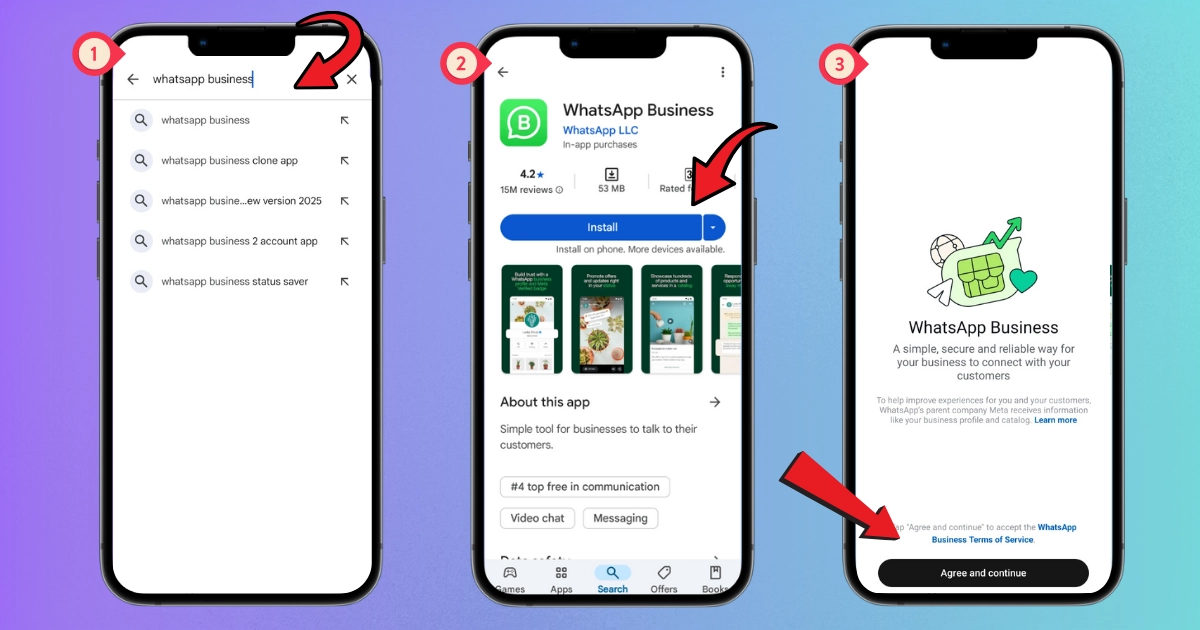
Download the WhatsApp Business app from your app store.
Register your business phone number and check it.
Type your business name. Pick a name that matches your brand.
Fill in your business profile with your address, description, website, and hours.
Add a profile picture that shows your logo or something customers know.
Try features like away messages, greeting messages, and quick replies.
Start sending updates about your products or services to your customers.
Tip: Answer customer questions fast. Quick replies help you build trust and get more sales.
Create a Professional Profile
Your WhatsApp business profile is the first thing customers see. A good profile makes you look honest and professional. Here’s what you should add:
A clear business description that tells people what you do.
Your business hours so customers know when you are open.
Contact options, like email or website, so customers can reach you easily.
Use your logo and business colors to keep your branding the same.
Follow privacy rules to protect your customers’ information.
Read More : How to Create a WhatsApp Business Profile Step by Step
A professional profile helps you sell on WhatsApp. It makes customers feel safe and sure when they contact you.
Challenge | Description |
|---|---|
Managing Customer Consent | Make sure you have permission to message your customers. |
Compliance with Regulations | Always follow privacy and data protection rules. |
Maintaining Quality Customer Experience | Balance quick replies with personal attention to keep customers happy. |
Build Your Product Catalog
A great product catalog helps you sell on WhatsApp. The WhatsApp Business app lets you make a catalog with photos, prices, and details. Here’s how to make yours better:
Use clear, high-quality pictures that look good on phones.
Write simple product names and descriptions. Do not use hard words.
Update your catalog often. Remove items that are not in stock.
Put products into groups so customers can find what they want.
Add calls to action, like “Tap to order now” or “Message for more info.”
A neat catalog helps customers look and buy without leaving WhatsApp. This easy shopping builds trust and can help you sell more. When you sell products on WhatsApp, a good catalog makes it easy for customers to pick and buy what they need.
Note: Customers can shop anytime by looking at your catalog in the WhatsApp Business app.
If you follow these steps, you will have a strong start for selling on WhatsApp. You will look professional, stay organized, and make it easy for customers to buy from you.
How to Sell on WhatsApp Easily with SheetWA

Ready to make your sales process smoother? SheetWA helps you send messages to many customers on WhatsApp without saving their numbers. You can create message templates, attach images or documents, and automate your communication. This tool makes your work faster and helps you reach more people with less effort.
SheetWA gives you these benefits:
Send bulk messages on WhatsApp without saving contacts.
Create and reuse message templates for your sales campaigns.
Attach files, like product images or flyers, in one message.
Use simple copy-paste to start quick campaigns.
SheetWA works with Google Sheets, Excel, and CSV files. You can organize your customer data and send personalized messages. This makes your sales campaigns more effective and helps you build better relationships with your buyers.
Let’s walk through the steps to get started.
Install and Set Up SheetWA
You can set up SheetWA in just a few minutes. Here’s how you do it:
Open your computer and go to WhatsApp Web.
Download the SheetWA extension from the Chrome Web Store.
Click “Add to Chrome” and confirm the installation.
After installing, open WhatsApp Web. You’ll see the SheetWA icon.
Click the icon and sign in with your Google account.
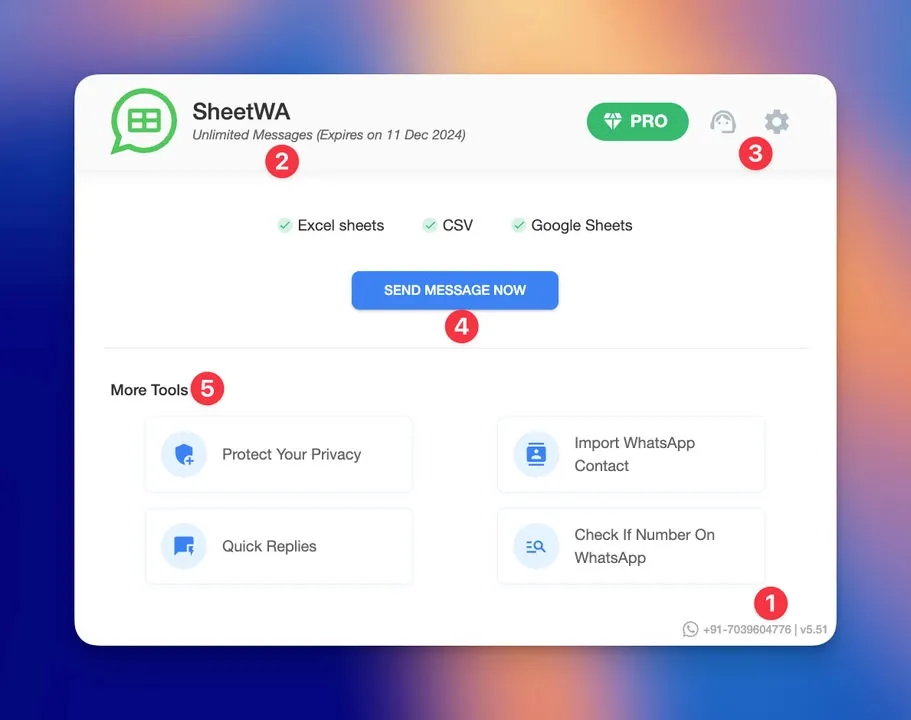
SheetWA will connect to your WhatsApp account and show your dashboard.
Tip: Make sure you use WhatsApp Web, not the mobile app. SheetWA works best on your browser.
Once you finish these steps, you’re ready to start sending messages. The dashboard is easy to use. You can see your message quota, profile, and options for sending messages.
Connect Google Sheets, Excel, or CSV
SheetWA lets you use your customer data from Google Sheets, Excel, or CSV files. This makes it easy to manage your sales contacts and send messages.
Here’s how you connect your data:
Click “Send Message Now” on the SheetWA dashboard.
Choose your data source: Google Sheets, Excel, or CSV.
For Google Sheets, paste the sheet’s URL. For Excel or CSV, upload the file.
Select the sheet or tab with your customer list.
Pick the rows you want to message. You can send to everyone or just a few.
Map the phone number column and set the country code if needed.
Write your message or pick a saved template.
Add images, videos, or documents if you want.
Preview your message to check for mistakes.
You can personalize each message with customer names or order details. This helps your sales messages feel friendly and direct.
Note: Always double-check your country code settings. This helps your WhatsApp messages reach the right people.
Organize and Personalize Your WhatsApp Messages
Making your whatsapp messages personal helps your sales stand out. When you organize messages and add a friendly touch, customers feel special. They think you are talking just to them. This builds trust and helps your sales campaigns work better.
Map Fields for Personalization
You want each customer to feel important. SheetWA lets you use your data to make every whatsapp message personal. Here is how you do it:
Use variables for names and details. Add things like @Name or @OrderID in your message.
Match your data fields. Connect your Google Sheet or CSV columns to these variables.
Pick or make message templates. Save time by using templates for similar sales messages.
Add pictures or videos for a personal touch. Media makes your message more interesting.
Check your message before sending. Always look at your message to make sure it looks good.
If you write like you are texting a friend, your whatsapp messages feel warm and friendly. Use emojis, but not too many. Keep your message short and clear. Focus on one thing in each message, like asking a question or sharing a special offer.
Personalizing messages builds trust. It shows customers you care about them. You can send reminders, holiday sale updates, or coupon codes. These small things help you connect and get more sales.
Create and Use Message Templates
Templates help you save time and keep your whatsapp messages looking good. You can use different templates for different sales messages. Here is a simple guide:
Category | Purpose | Examples |
|---|---|---|
Utility | Customer service, shipping, or support | Order confirmation, shipping updates, FAQs |
Marketing | Promotions, sales, or offers | Product launches, discounts, exclusive offers |
Appointment Reminders | Confirmations or reminders | Appointment times, password resets, account recovery |
You can make special campaigns that fit your customers’ needs. Use what they like or bought before to send the right message at the right time. This makes your whatsapp sales campaigns work better.
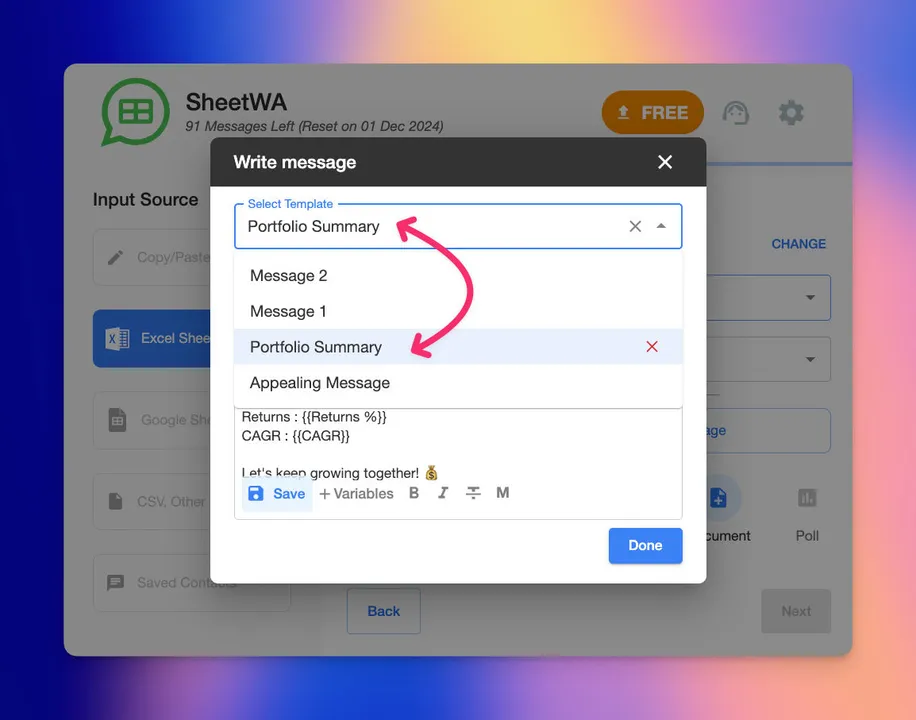
Tip: Start your message with a question to get your customer’s attention. Show how your product helps them. Use phrases like “Limited time offer!” or “Only a few left!” to make people act fast.
Add Media Attachments
Pictures can show more than words. Adding images, videos, or documents to your whatsapp messages can help your sales. You can show your products, share flyers, or send special deals.
A clothing store can send style tips with photos or videos.
A restaurant can share a menu or a quick order button.
A travel agency can show vacation packages in one message.
Media attachments make your whatsapp messages more fun and interesting. Customers can see what you offer without leaving the chat. This helps them decide faster and can lead to more sales.
Note: The whatsapp catalogue feature lets customers look at your products easily. In-app payments make buying simple and quick.
When you organize and personalize your whatsapp messages, you make every customer feel special. This can help you grow your sales and build strong relationships.
Selling on WhatsApp: Batch Messaging and Time Gaps
Sending messages on WhatsApp for sales can be fun, but you need to keep your account safe. If you send too many of the same message at once, WhatsApp may think you are spamming. You can stop this by using batch messaging and adding random time gaps. These smart tricks help your messages reach people and keep your account in good shape.
Send Messages in Batches
When you want to talk to many customers, send messages in small groups. Do not send hundreds of messages at the same time. That can make WhatsApp block your account. Here is what you should do:
Split your contact list into smaller groups.
Send a special message to each group.
Wait between each sales campaign so you do not send too much.
If you only send sales messages once or twice a week, you are less likely to get blocked. Using the customer’s name or talking about their last order makes your message feel special. This also helps you avoid being marked as spam.
Tip: Sending messages in small groups keeps your WhatsApp account safe and helps your sales work better.
Set Random Time Gaps
You want your messages to look like a real person sent them. If you send all your messages at once, WhatsApp may block you. Adding random time gaps between groups helps you look real, not like a robot. This makes it more likely your messages will go through.

With SheetWA, you can set a time gap between each message. The tool sends messages with short breaks, just like you would if you typed them yourself. This lowers your chance of getting banned and helps more people see your sales messages.
Note: Random time gaps make your WhatsApp messages safer and work better.
Preview and Review Messages
Before you send your WhatsApp sales messages, always check them first. This helps you find mistakes and make sure your messages look right. If you skip this step, you might send the wrong message or upset your customers.
Here is a table that shows common mistakes and how to fix them:
Mistake | Description | How to Avoid |
|---|---|---|
Sending Messages Without Proper Opt-In | Adding contacts without consent can lead to blocks. | Use a clear opt-in process. |
Using the Wrong Template Category | Misclassifying message types can result in blocks. | Match message purpose to the correct template. |
Overwhelming Customers with Too Many Messages | Too many messages can lead to spam reports. | Limit broadcasts to 2-3 per week. |
Sending Generic, Low-Value Messages | Vague messages lead to low engagement. | Personalize with specific offers. |
Ignoring Quality Rating Warnings | Low-quality templates can harm your account. | Monitor template quality ratings. |
Failing to Provide Easy Opt-Out Options | Difficult opt-out increases block rates. | Include clear opt-out instructions. |
Requesting Sensitive Information via Broadcast | Asking for sensitive info violates policies. | Never request sensitive info on WhatsApp. |
Always check your message for spelling, names, and any files you attach. Make sure you tell customers how to stop getting messages if they want. When you review your WhatsApp messages, you keep your account safe and show customers you care.
Read More : Top Mistakes People Make in WhatsApp Bulk Marketing
Emoji: ✅ Checking your WhatsApp sales messages helps you avoid mistakes and keeps your campaigns looking good.
By using batch messaging, random time gaps, and checking your messages, you can run great WhatsApp sales campaigns. These steps help you reach more people, avoid spam, and keep your account safe.
Manage and Track Your WhatsApp Sales

You want your whatsapp sales to work well. Watching your messages and how customers react helps you know what is good and what needs help. When you manage your whatsapp sales, you build trust and keep people happy.
Use Delivery Reports
Delivery reports show if your whatsapp messages reach customers. You can see which messages get delivered and which get replies. You can also check how many people open your sales updates. This helps you learn about your customer interactions and make your next campaign better.

You can use tools like HubSpot, Salesforce, or Zoho to organize your whatsapp sales data. These tools help you find patterns and make smarter choices. If you see a low delivery rate, you can change your message or update your contact list.
Tip: Check your delivery reports often. This helps you find problems early and keep your whatsapp sales strong.
Handle Customer Responses
Customer replies on whatsapp can help your sales. When customers answer, you get a chance to help them and answer questions. You should always reply fast and make each customer feel special.

Try these steps to handle customer replies:
Send friendly follow-up messages to customers who have not bought in a while.
Remind customers about items left in their cart. This can help you get back lost sales.
After confirming an order, offer a discount code for their next buy.
Share product updates and ask for feedback.
Use cross-selling to suggest other products customers might like.
When you reply quickly and keep talking, customers trust you more. They feel like you care about them. This makes your whatsapp sales work better and helps your business grow.
Emoji: 💬 Fast replies make your customer chats feel personal and help your sales.
Maintain Consent and Opt-Out Lists
Responsible messaging keeps your customers happy and your business safe. Before you send whatsapp messages, always get clear permission from customers. You must give them an easy way to stop messages if they do not want more.
Here’s what you need to remember:
Get clear permission before sending any whatsapp sales messages.
Give easy opt-out instructions in every message.
Follow privacy laws like GDPR and CCPA.
Keep a list of customers who have opted out and do not message them again.
You can collect opt-ins through whatsapp or other places. Always respect your customers’ choices. If someone asks to stop getting messages, remove them from your list right away.
Step | What to Do |
|---|---|
Get Consent | Ask customers if they want to get messages |
Give Opt-Out Option | Tell customers how to stop messages |
Stay Compliant | Follow privacy and anti-spam laws |
Note: Responsible messaging builds trust and keeps your customer chats positive.
Managing your whatsapp sales means watching delivery, replying to customers, and respecting their choices. When you do these things, you build a strong sales funnel and keep your customers coming back.
Pro Tips to Maximize Sales on WhatsApp
You want your business to be noticed. You also want to reach more customers. Here are some smart ways to help you sell more on whatsapp and make your messages better.
Personalize Customer Engagement
Making your whatsapp messages personal helps you build trust. It also keeps customers coming back. If you know what your customers like, you can send them good offers at the right time. Try these ideas:

Suggest products based on what customers bought before.
Give quick help and answer questions fast.
Send messages that match each customer’s likes and past orders.
Share special deals and reminders to keep your group active.
Use quick replies, greetings, and away messages to make customers feel welcome.
Add pictures, videos, or buttons to make your messages fun and easy.
Tip: When you make your whatsapp messages personal, you show customers you care. This makes your sales messages work better and helps you build strong friendships.
Promote with Status and Groups
You can use whatsapp Status and groups to reach more people and run deals. Status updates let you share news, offers, and fun moments. Groups help you talk to people who want to hear from you.
Post new products, limited-time deals, or special events on your whatsapp Status.
Share promo codes and product news to keep customers interested.
Use groups to answer questions, share tips, and build a friendly group.
Ask customers to join your group for special deals and early sales.
WhatsApp Feature | How It Helps Your Sales | Example Use Case |
|---|---|---|
Status | Keeps customers engaged and informed | Announce flash sales or new items |
Groups | Builds community and direct connection | Share tips, answer questions |
Note: Posting often on whatsapp Status and chatting in groups helps you stay in customers’ minds. You can run deals and boost your sales by making your brand part of their day.
Optimize Message Timing
Sending your whatsapp messages at the best time helps a lot. You want customers to see your offers when they are ready to buy.
Send messages during lunch or evenings when customers check their phones.
Do not send too many messages at once. Space them out so customers do not feel bothered.
Use SheetWA’s batch messaging and time gap tools to make your messages look real.
Watch when customers reply most and change your timing for future sales.
Emoji: ⏰ Timing is important! Sending whatsapp messages at the right time helps you reach customers when they want to shop.
If you use these pro tips, you can talk to more customers, run deals, and grow your sales. Make your messages personal, use whatsapp Status and groups, and send messages at good times. These steps help you sell more on whatsapp and keep your business growing.
You can begin selling on whatsapp by making a business account. Build a catalog to show your products. Use SheetWA to talk to customers. Make your messages personal and add pictures. Follow up with customers to help your sales grow. Good whatsapp campaigns use pictures, quick replies, and smart timing. Many businesses say they get more replies and faster answers when they use whatsapp and SheetWA together.
Try new tools, keep your chats neat, and see your sales go up. Customers like it when you make messages feel special.
Business Type | Benefit Description | Result |
|---|---|---|
Retail Brand | Sent tips about products and welcome notes | More people reply, more sales |
Travel Agency | Shared trip news and confirmations | Quicker answers |
E-commerce Platform | Sent deals and product pictures | Fewer carts left behind |
Make a whatsapp business account
Build your profile and product catalog
Use SheetWA for group and personal messages
Share pictures and deals to get customers interested
Watch your sales and keep making things better

FAQ
How do I start selling products on WhatsApp?
First, download the WhatsApp Business app. Next, make your business profile. Then, create a product catalog. After that, use SheetWA to send messages to customers.
Can I send bulk messages without saving contacts?
Yes! SheetWA lets you send lots of messages at once. You can use Google Sheets, Excel, or CSV files. You do not need to save every contact on your phone.
What types of files can I attach to my messages?
You can add images, videos, and documents. You can use JPEG, PNG, MP4, and PDF formats. This helps you show products or share important info.
How do I personalize my sales messages?
You can use variables like {Name} or {OrderID} in your templates. SheetWA matches these to your data. Each customer gets a message just for them.
Is there a way to avoid getting blocked for sending too many messages?
Send your messages in small groups. Add random time gaps between each group. Always ask customers before sending sales updates.
How do I manage customer opt-outs?
Put clear opt-out steps in your messages. Keep a list of people who do not want messages. Respect their choices to keep trust.
Can I track which messages were delivered?
SheetWA gives you delivery reports. You can see which messages were sent and which ones failed. This helps you make your next campaign better.
What makes WhatsApp a good choice for selling?
You can reach customers right on their phones. You can send personal messages and product images. You get quick replies. Selling is easy and works well.