

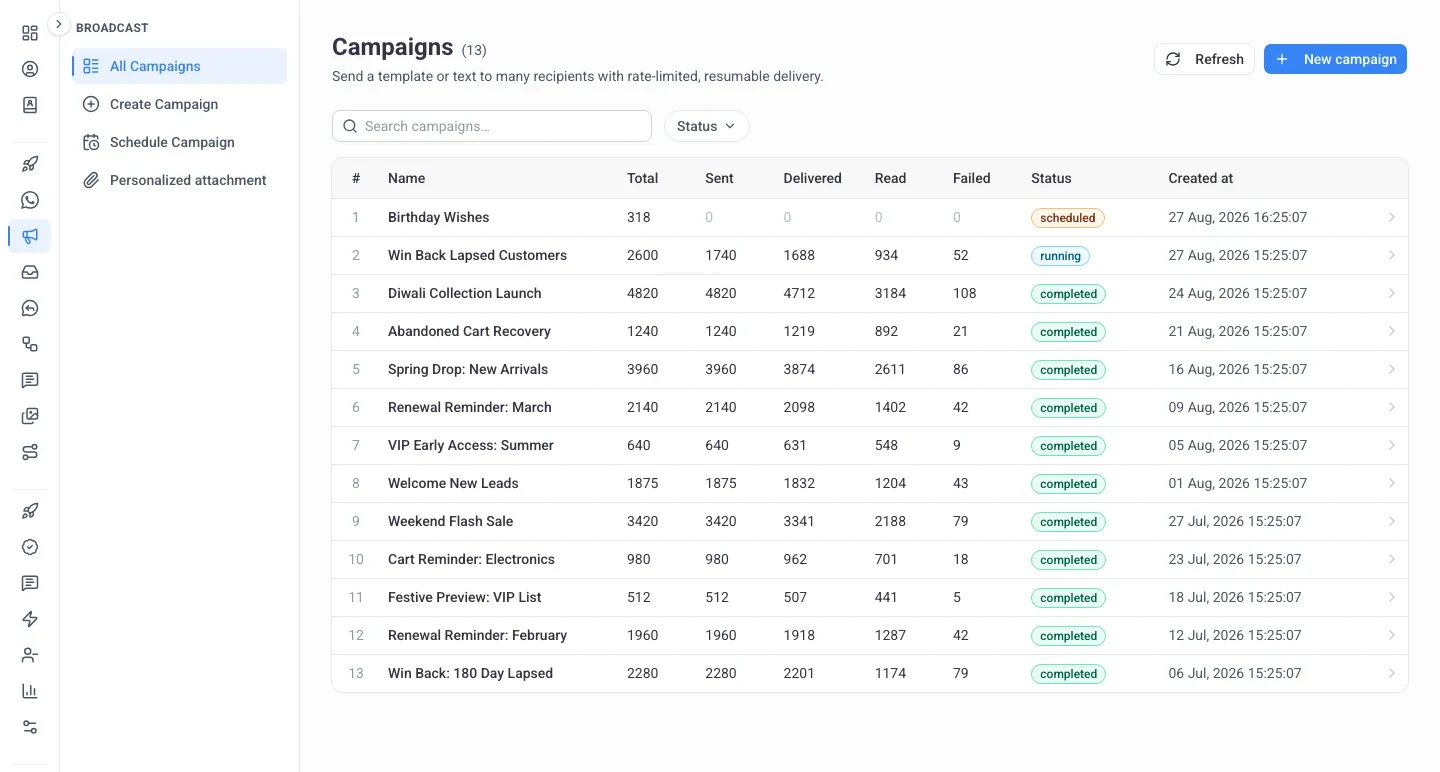
Reach your whole list in one send.
Explore the WhatsApp broadcast tool, the WhatsApp CRM and the WhatsApp team inbox. All of it runs on the official WhatsApp Business API.
What Our Customers Say
I love SheetWA. The Google Sheets feature simplifies messaging. Customer service is outstanding, Thanks, team!
Anjali
India
SheetWA is my favorite WhatsApp tool! Templates are a lifesaver. With SheetWA, I save hours weekly.
Emily
USA
My SheetWA experience has been incredible. The app is polished, perfect for real estate business. It's a go-to!
Maria
Brazil
Why businesses choose SheetWA
Send WhatsApp Messages from Google Sheets
Send WhatsApp messages straight from Google Sheets. Link your account and every row goes out personalized, automatically.
Message your whole contact list from Google Sheets automatically.
Personalize and customize WhatsApp messages using data from your Google Sheets.
Send WhatsApp Messages from Excel
Send WhatsApp messages from Excel files with SheetWA. Personalized messages go out automatically, with no need to save numbers.
Send personalized WhatsApp messages from an Excel file in minutes.
Personalize and automate WhatsApp messaging from excel without saving contacts.
Personalized WhatsApp Messages
Write once and every contact gets a message written for them, using their name, order or renewal date straight from your contact fields.
Customize each message with details specific to the recipient.
Ideal for follow-ups, reminders and campaigns that need to feel personal.
Make your messages visually appealing
Use rich formatting like bold, italics, bullets and send emoji-rich WhatsApp messages using our free WA sender.
Format WhatsApp messages with bold text, italics, emojis and media.
Perfect for WhatsApp marketing and personalized business communication.
WhatsApp Message Preview
Preview exactly how your message will look before it goes out. Deliver polished, on-brand messages that carry your WhatsApp marketing.
Optimize every message with WhatsApp preview, formatting, and media support.
Great for customer engagement, follow-ups and promotional campaigns.
Control Your Sending Pace
SheetWA paces your sending with random time gaps, delays between batches and timestamping.
Reduce chances of getting blocked with random delays, batch timing, and timestamped WhatsApp messages.
Automated pacing that keeps your outreach steady and controlled.
Send Images, Videos, Documents Easily with WA Sender
SheetWA lets you send images, videos and documents to your contacts easily.
Share multimedia files with your contact list without saving numbers.
Fast, personalized messaging with automation built in.
Create message templates
Create and save message templates to speed up your outreach. Reuse messages and manage follow-ups effortlessly.
Store WhatsApp message templates for quick, repeated use in campaigns.
Add personalization to your templates using contact fields.
Everything SheetWA Does
Everything you need in one place, from contact management to automated follow-ups.
Automated Messages
Send Images
Save Templates
Add Emoji
Message Formatting
Send Videos
Use Google Sheets
Message Preview
Random Time Gap
Bold & Italic
Save ideas as drafts
Send Documents
Upcoming Events
Save Contacts
Verify Numbers
Use Excel
Personalized Messages
Automated Messages
Send Images
Save Templates
Add Emoji
Message Formatting
Send Videos
Use Google Sheets
Message Preview
Random Time Gap
Bold & Italic
Save ideas as drafts
Send Documents
Upcoming Events
Save Contacts
Verify Numbers
Use Excel
Personalized Messages
Automated Messages
Send Images
Save Templates
Add Emoji
Message Formatting
Send Videos
Use Google Sheets
Message Preview
Random Time Gap
Bold & Italic
Save ideas as drafts
Send Documents
Upcoming Events
Save Contacts
Verify Numbers
Use Excel
Personalized Messages
Automated Messages
Send Images
Save Templates
Add Emoji
Message Formatting
Send Videos
Use Google Sheets
Message Preview
Random Time Gap
Bold & Italic
Save ideas as drafts
Send Documents
Upcoming Events
Save Contacts
Verify Numbers
Use Excel
Personalized Messages
Join our family
+170
Countries Worldwide
+200K
Happy Customers
+50M
Messages Sent
SheetWA's user interface is miles ahead of any other tool I've tried.
Ahmed, UAE
Phenomenal customer support. Responsive and helpful, they prioritize customer satisfaction
Amira, Egypt

Joining SheetWA was likely my most significant decision of the year.
Tan, Singapore
Only tool that allows me to send WhatsApp messages directly from Google Sheets.
Hafiz, Malaysia
Frequently Asked Questions
What is SheetWA?
SheetWA gives you two ways to reach customers on WhatsApp. The SheetWA Extension works inside WhatsApp Web on Chrome or Edge using your own number, with no per-message cost. The SheetWA WhatsApp API runs on Meta's official Cloud API with approved templates, scheduling, and delivery reporting. Both are managed from the same dashboard, where you keep your contacts, tags and custom fields. Trusted by 20,000+ professionals.
How can I send 1000 messages at once on WhatsApp?
WhatsApp's built-in broadcast feature is limited. With SheetWA you can message a large list from a spreadsheet or your saved contacts, either through the Extension on WhatsApp Web using your own number, or through the SheetWA WhatsApp API with approved templates and scheduling.
Can I use the WhatsApp Business API with SheetWA?
Yes. The SheetWA WhatsApp API is live and runs on Meta's official Cloud API. It supports both connection modes: coexistence, where your number keeps working in the WhatsApp Business app and your chat history syncs, and full Cloud API migration for higher throughput. Many tools only offer full migration.
How do I send messages on WhatsApp Web for free?
Open WhatsApp Web in Chrome, install the SheetWA Extension, add your contact numbers, compose your message, attach up to 7 files, and click Send. No need to save numbers or create groups.
How to send messages without saving numbers?
Use the SheetWA Chrome extension to send WhatsApp messages to unsaved contacts. This simplifies communication for businesses and personal users by eliminating the need to save every new contact in your phone.
WhatsApp Web not opening anymore! How to fix it?
If WhatsApp Web is not opening, try reloading the page, check your internet speed (minimum 5 Mbps), disable interfering extensions, or use a new browser instance. As a last resort, backup and reinstall WhatsApp on your phone. If issues persist, contact support at SheetWA.
Can I send a message directly to a WhatsApp group?
Yes. The SheetWA Extension supports group messaging directly from WhatsApp Web. You can also export group contacts and message people individually if you prefer.
Can I send messages to numbers that are not saved in my contacts?
Yes, SheetWA allows you to send messages to any WhatsApp number, even if they are not saved in your contacts.
Does WA Sender work in my country?
Yes, WA Sender works globally. Users can make payments from any country using Stripe (where applicable). Indian users can pay via UPI or QR code as well.
Does the SheetWA Extension work on the WhatsApp Desktop or Mobile App?
No. The SheetWA Extension only works on WhatsApp Web through Chrome or Edge on desktop (Windows, Mac or Linux). It does not work with the mobile or desktop app versions of WhatsApp. The SheetWA WhatsApp API has no such restriction, since it runs on Meta's servers.
Does the premium version prevent WhatsApp bans?
No. While the premium version offers more features like Excel uploads and personalization, it does not guarantee protection from number bans. Following usage guidelines is the best way to minimize ban risks.
My number got banned on WhatsApp. What should I do?
If banned, go to WhatsApp > Support, explain your situation, and email [email protected]. Attach relevant screenshots if needed. Most accounts are unbanned within 1–2 days. You can also request to transfer your SheetWA plan to a different number.
How can I send WhatsApp messages without getting banned?
To avoid bans: 1) Gradually increase message volume. 2) Use time gaps between messages. 3) Include an unsubscribe option. 4) Use timestamps. 5) Don’t use your official number. 6) Set up a proper business profile with photo and description.
What other tools does SheetWA offer?
Apart from the WA Sender extension and the WhatsApp API, SheetWA offers WhatsApp Sender, WhatsApp Privacy Extension, WhatsApp Contact Saver, WhatsApp Number Checker and WhatsApp Quick Reply, plus contact management with tags and custom fields.
Grow Your Revenue on WhatsApp with SheetWA
Organize your contacts, automate your follow-ups and track every conversation with SheetWA. Personalize each message and turn more chats into customers.
Get Started For Free