
You want your WhatsApp campaigns to stand out and capture attention. People open WhatsApp messages almost every time, and most respond in less than two minutes. By employing personalisation techniques for your WhatsApp campaigns, each message feels unique and tailored. Studies indicate that 31% of users prefer brands to send them offers specifically designed for them. Consider these statistics:
Statistic | Value |
|---|---|
Messages sent per day | 120 billion |
Average user time on WhatsApp | 38 minutes |
Average response time | Under 2 min |
Percentage of shared content as media | 70% |
Many individuals use WhatsApp to chat, shop, and share media. Personalized messages enhance your ability to connect with people and foster trust.
Key Takeaways
Personalization helps people pay attention. Change your messages to fit what customers like. This gets better replies.
Use audience segmentation. Put customers into groups by age or habits. Send messages that match each group.
Dynamic fields make messages feel special. Add names and details to connect with people.
Media attachments help people interact more. Use pictures or videos to make messages fun.
Batch sending saves you time. Use tools like SheetWA to send messages to many people fast.
Monitor engagement metrics. Watch how many people get and answer your messages. This helps you do better next time.
Respect customer privacy. Always ask before you send messages. Make it easy for people to stop getting messages.
Follow WhatsApp policies. Stick to the rules to keep trust and avoid problems with your account.
Why Personalization Drives WhatsApp Engagement
You want people to see your messages. WhatsApp is where many people spend time. Most users check WhatsApp often every day. If your message feels special, people will read it. They might reply faster. Sending messages that match what customers like helps you get more engagement.
Benefits of Personalization in WhatsApp Marketing
Let’s talk about why personalized WhatsApp marketing works well. When you send a message just for someone, it feels important. People enjoy getting offers and news that fit their interests. You can use WhatsApp to send campaigns based on what customers do and like. This helps you connect better and build trust.
Main benefits:
You can make campaigns that fit what customers want by using their data.
Splitting your audience lets you send messages that matter to them.
WhatsApp lets you talk directly, so your messages get seen.
Customers feel special when you use their name or mention what they like.
Check out this table to see how personalization helps your business:
Benefit | Description |
|---|---|
Enhanced Customer Engagement | Messages that match customer likes get more attention. |
Improved Retention Rates | Targeted messages help keep your best customers coming back. |
Increased Conversion Rates | Special offers and rewards make people buy more. |
You can use analytics to split your audience and send messages that fit. This plan helps you get better results from WhatsApp marketing.
How Personalization Impacts Customer Relationships
When you personalize your WhatsApp campaigns, you make stronger bonds. Customers want brands to know them. If you say someone’s name or suggest products they like, you show you care. This friendly way makes people trust your brand.
Some ways personalization helps customer relationships:
Saying hello with their name feels warm and professional.
Suggesting products makes shopping easier and fun.
Checking in shows you care about their business.
You can also send special offers and news through WhatsApp. This direct way helps you keep customers interested and loyal. Many companies get lots of repeat customers with personalized WhatsApp campaigns. About 68% of repeat customers come back because they feel close to the brand.
If you want more customer engagement, start making your WhatsApp messages personal. You will see better results and build strong relationships.
Audience Segmentation for WhatsApp Campaigns
If you want your WhatsApp marketing to work, you need to send the right message to the right people. That’s where audience segmentation comes in. When you split your audience into smaller groups, you can talk to each group in a way that feels personal and relevant. This makes your messages more interesting and helps you get better results.
Identifying Key Segments
You can start by looking at who your customers are and what they do. Think about their age, where they live, and how they interact with your business. You can also check what they buy and how often they reply to your messages. This helps you create groups that make sense for your WhatsApp campaigns.

Demographics and Behaviors
Demographics are things like age, gender, or job. Behaviors are about how people act, like how often they shop or respond to your messages. When you use both, you can make your WhatsApp messages fit each group.
Below Table to help you see some ways to segment your audience:
Segmentation Type | Description |
|---|---|
Behavioral Segmentation | Group people by how often they reply, buy, or interact with your messages. |
Customer Journey Mapping | Make groups for new customers, regular buyers, or people who stopped buying. |
Interest-Based Targeting | Split your audience by what products or topics they like. |
Geographic Intelligence | Use location to send local deals or news. |
Value-Based Grouping | Focus on people who spend more or have high potential. |
Engagement Timing | Send messages when people are most active. |
Lifecycle Automation | Change groups as people take new actions, like making a first purchase. |
You can also look at what leading brands do. They often use these parameters:
Parameter | Description |
|---|---|
Behavior | Target people who shop often and give them special deals. |
Location | Send messages based on where your audience lives, like for local events. |
Purchase History | Suggest products based on what someone bought before. |
Purchase and Interaction History
When you check what people have bought or how they interact with your business, you can send messages that really matter to them. For example, if someone bought shoes last month, you can tell them about new shoe arrivals. If a customer always opens your messages, you can send them early-bird offers.
Tip: Use your sales records and chat history to find patterns. This helps you make smarter groups for your WhatsApp campaigns.
Organizing Data for Segmentation
Good audience segmentation starts with organized data. You want your customer list to be clean and easy to use. Here’s how you can do it:
Make sure each customer has their name, phone number, and other details in your file.
Use columns for things like age, city, last purchase, or favorite product.
Keep your phone numbers in the right format. Add the country code if you have customers in different countries.
Remove any duplicate or old numbers.
Update your list often so it stays fresh.
You can use Google Sheets, Excel, or CSV files to keep your data tidy. If you want to send messages to a small group, you can even copy and paste numbers right into SheetWA.
Note: Always double-check your country code settings before sending messages. This helps your WhatsApp messages reach the right people, no matter where they live.
Also More : How to Use a Bulk WhatsApp Sender Tool Safely
Using SheetWA for Segmented Messaging
SheetWA makes audience segmentation easy. You can upload your Google Sheets, Excel, or CSV files right into SheetWA. Here’s how you can use it for your WhatsApp campaigns:
Choose Your Data Source
Pick the file or sheet with your segmented audience. You can use Google Sheets, Excel, CSV, or just copy and paste numbers.
Map Your Fields
Tell SheetWA which column has the phone numbers, names, or other details. This lets you personalize each message.Set Country Codes
Select the right country code option. If your numbers don’t have a country code, SheetWA can add it for you. If you have customers in many countries, use a separate column for country codes.Send to Selected Rows
You can pick a range of rows to send messages to just one segment at a time. For example, send to rows 2–50 for one group, then 51–100 for another.Preview and Send
Always preview your messages. Make sure the right names and details show up. Then send your WhatsApp messages in batches.

Pro Tip: Use SheetWA’s batch sending and time gap features to avoid spam flags and keep your account safe.
When you organize your data and use audience segmentation, your WhatsApp campaigns become much more powerful. You reach the right people with the right message, every time.
Personalisation Techniques for Your WhatsApp Campaigns
You want your WhatsApp campaigns to feel like real talks, not just a group message. Personalisation techniques help you do this. Let’s see how you can make every message special.
Dynamic Fields and Variables
Think about getting a message that says, “Hi, your order is ready!” Now, think about one that says, “Hi Sarah, your order #1234 is ready for pickup!” The second message feels nicer. That’s because it uses dynamic fields and variables.
Personalisation techniques let you use special spots in your messages. These spots pull real info from your list, like names or order numbers. When you send your campaign, each person gets a message made just for them.
Here’s a quick look at how dynamic fields work:
Feature | Description |
|---|---|
Dynamic Fields | Add details like customer names, order info, or loyalty status to messages. |
Engagement | Make messages more relevant by matching what each person cares about. |
Why use dynamic fields and variables?
You save time because you don’t write each message by hand.
You make fewer mistakes since the system fills in the details.
You get more replies because people like messages made for them.
Tip: Try using variables like @Name, @LastPurchase, or @LoyaltyTier in your messages. You’ll see more people answer and be happy.
Message Templates and Customization
Templates help you send messages fast, but you don’t want every message to sound the same. Personalisation techniques let you change templates for each group or person.
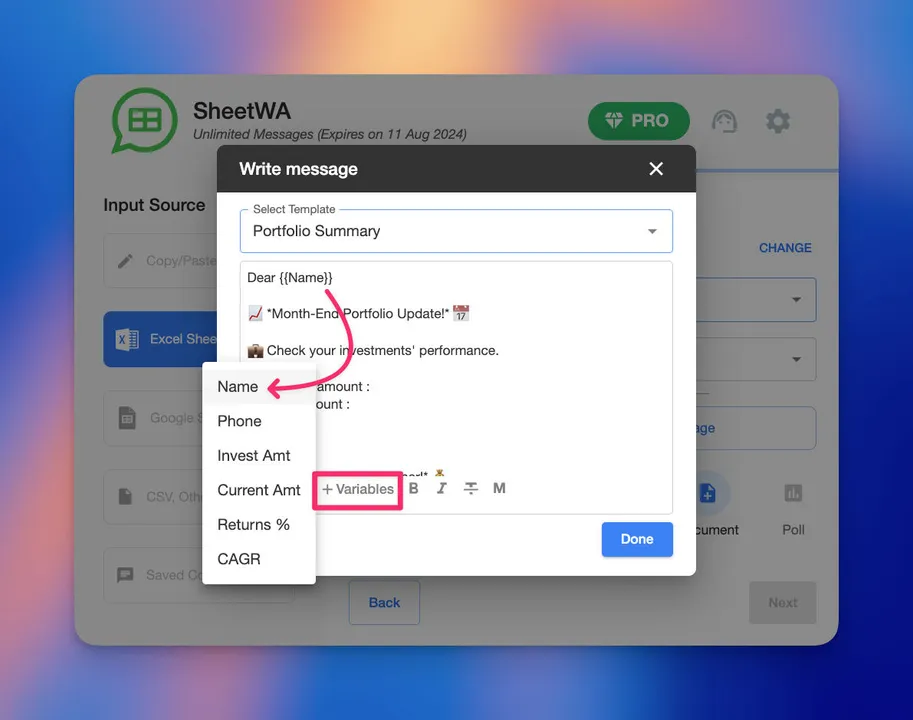
How you can make your templates better:
Use variables for more than just names. Add order info, times, or favorite things.
Keep your messages short and easy to read.
Add a call to action, like “Reply YES to confirm your booking.”
Make sure your message follows WhatsApp’s rules.
Give people a way to ask questions.
Send messages when your audience is most active.
Only send what matters. Don’t send too many texts.
Use bullet points or numbers to make reading easy.
Add pictures or links only if they help your message.
Here’s a sample template you can use in SheetWA:
Hi @Name, thanks for your recent purchase! Your order @OrderID will arrive soon. Need help? Reply to this message.
Note: Split your audience and use different templates for each group. For example, send one message to new customers and another to loyal fans.
Hyper-Personalized Messaging with SheetWA
You can make your messages even more personal with SheetWA. This tool lets you use real-time data in every message. You can add things like what’s in someone’s cart, their loyalty tier, or their last buy.
With SheetWA, you can:
Use dynamic variables to fill in details for each person.
Set up your data in Google Sheets, Excel, or CSV files.
Match each column to a variable in your message.
Preview every message before you send it to check it looks right.
Let’s say you want to send a special offer to people who bought shoes last month. You can set up your data, write a message like “Hi @Name, since you loved our shoes, here’s 10% off your next pair!” and let SheetWA do the rest.
Pro Tip: Always preview your messages before sending. Check that every variable pulls the right info. This helps you avoid mistakes and keeps your messages looking good.
Personalisation techniques for your whatsapp campaigns help you connect with your audience in a real way. When you use dynamic fields, smart templates, and extra personalization with SheetWA, you get more replies and stronger relationships. Personalized messaging is not just about using a name—it’s about making every message count.
Media Attachments and Formatting
You want your whatsapp messages to be noticed. Adding pictures, videos, or files makes your campaigns more fun. People like seeing product photos, flyers, or short video greetings. When you use media attachments, people pay more attention and interact more.

You can use SheetWA to add media files to your whatsapp campaigns. Just upload your picture, video, or file when you set up your message. This works for new products, event invites, or sending bills. Your audience gets a better experience, and you get more replies.
Formatting is important too. You can make your whatsapp messages bold, italic, or use emojis. This helps you show important details, like special deals or deadlines. Here’s how you can use formatting in SheetWA:
Read More : WhatsApp Formatting Tips to Enhance Your Messages
Bold for main points: Sale ends soon!
Italics for extra info: Limited stock available.
Emojis to add fun: 🎉, 👍, 🛒
Tip: Use formatting to help readers find the main message. Make your key point easy to see.
Here’s a simple example of a formatted whatsapp message with media:
Hi @Name, 🎉
Your special offer is here! Look at the flyer attached for more info.
*Sale ends Friday.* Don’t miss it!
Always preview your whatsapp message before sending. Check that your media files show up right. Make sure your formatting looks good on computers and phones. If something is wrong, fix it before you send.
Check your message for mistakes or missing info.
Make sure all attachments open and look good.
Test your formatting with a sample message.
Note: Messages with good formatting and media get more attention and higher engagement. Your whatsapp campaigns will be more memorable and look professional.
When you use media attachments and smart formatting, your whatsapp marketing stands out. You connect with your audience in a way that feels personal and fun.
Batch Sending and Automation for Engagement
You want your whatsapp campaigns to reach many people, but you also want each message to feel personal. Batch sending helps you do both. With SheetWA, you can send messages to a group of contacts at once. This saves you time and keeps your communication organized. You stay in control of your campaigns and can focus on building real connections.
Batch Messaging with SheetWA
Batch messaging lets you send updates, offers, or reminders to many people in one go. You can upload your contact list from Google Sheets, Excel, or a CSV file. SheetWA helps you map each column, so every message uses the right name or detail. You can even pick a range of rows to target a specific group.
You don’t need to worry about technical setups. SheetWA works right from your whatsapp web, making it simple for anyone to use.
Tip: Use batch sending to keep your audience updated without sending each message one by one.
Setting Time Gaps and Avoiding Spam Flags
Sending too many whatsapp messages too quickly can look like spam. You want your account to stay safe. SheetWA lets you set a time gap between each message. This makes your messages look more natural and helps you avoid spam flags.

Check out these recommended time gaps:
Message Type | Recommended Time Gap |
|---|---|
Initial Messages | 30 – 50 messages per hour |
Gradual Increase | Increase slowly over days |
Delay Intervals | Use delay intervals |
You should also space out your campaigns. For marketing messages, send them 1-2 times per week. Try to keep at least 48 hours between broadcasts. This keeps your audience happy and your account healthy.
Read More : How to Send Bulk WhatsApp Messages Without Spamming
Note: Setting a random time gap in SheetWA helps your messages feel more personal and less like bulk spam.
Managing Message Delivery and Reports
After you send your whatsapp campaign, you want to know what happened. SheetWA gives you delivery reports so you can see which messages went through and which did not. This helps you spot problems and fix them fast.

Pro Tip: Use delivery reports to learn what your audience likes. This helps you make better whatsapp campaigns next time.
Batch sending, smart timing, and delivery reports help you run smooth whatsapp campaigns. You stay in control, avoid spam issues, and keep your audience engaged.
Best Practices for WhatsApp Marketing Campaigns
Privacy and Responsible Messaging
Keeping customer data safe is very important. Never share their information without asking. Only send messages that matter. Don’t send spam.
Checklist for privacy:
Get opt-in before you send any message.
Use approved templates for important updates.
Give an opt-out in every campaign.
Store customer data safely and limit who can see it.
Never sell or give away customer information.
You can use two-step verification and screen locks to keep your whatsapp account safe. If you send pictures or videos, use “View Once” so they disappear after being seen. This helps keep your audience’s privacy safe.
Note: Sending messages the right way helps you build trust and keeps people interested.
Read More : Top Mistakes People Make in WhatsApp Bulk Marketing
Message Quality and Timing
Good messages and timing are important in whatsapp marketing. Make your messages clear, friendly, and helpful. Don’t send too many or boring messages. People like real and honest talks.
Look at this table for tips:
Best Practice | Description |
|---|---|
Deciding the Right Time to Send Messages | Send during business hours and try different times. |
Keeping Campaign Goals Clear | Set simple goals for each campaign. |
Avoiding Mistakes | Don’t send too many or boring messages. |
Tracking What Works | Watch how many people get and answer your messages. |
Making Campaigns Feel Genuine | Use friendly words and sometimes send non-promotional messages. |
Send your whatsapp campaigns when people are most active. Try different times to see what works best. Messages sent at the right time get more replies and clicks.
Pro Tip: Use analytics to see which messages work best. Change your timing and content to match what your audience likes.
When you follow these best practices, people will want to read your whatsapp messages. You build trust, keep privacy safe, and your audience will come back.
Compliance with WhatsApp Policies
You want your whatsapp marketing to be safe and work well. Following the rules helps protect your business and your customers. When you follow the rules, people trust you more. Your account also stays in good shape. Here’s what you should know.
Always get clear permission before sending any whatsapp marketing message. People need to know what they are signing up for. You can use forms on your website, sign-ups in stores, or ads to get consent. Every message should let people leave easily. For example, add “Reply STOP to unsubscribe.” This shows you care about your audience.
Use the official whatsapp business platform for all your marketing. Make sure your business profile is complete and easy to find. When you send messages, say who you are. This helps people feel safe and trust your brand.
Before sending any promotional message, use templates that are approved. Submit your templates and wait for them to be checked. This keeps your messages following whatsapp’s rules. If someone sends you a message, reply within 24 hours. After that, only use approved templates to keep talking.
Send messages at good times. Don’t send too many messages close together. If you send too often, people might get annoyed or think it’s spam. Make sure your messages are helpful and matter to your audience.
You also need to follow the laws in your country. Different places have different rules for privacy and data. For example, you may need to follow GDPR in Europe or TCPA in the United States. Always have a privacy policy and keep user data safe. Never share information without asking.
Tip: Check whatsapp’s policy page often. Rules can change, so stay updated.
If you follow these steps, your whatsapp marketing will be safe and work well. You will build trust, avoid trouble, and give your audience a better experience.
You can get more people to pay attention to your WhatsApp marketing if you follow easy steps. First, make a list of people who said yes to get messages. Next, split your customers into groups by what they do. Write short messages with special offers for each group. Use SheetWA to help send out new products and deals. Check how your messages do and use numbers to make them better. Always ask people if you can message them and follow WhatsApp’s rules. When you talk to people in a personal way, they trust you more and want to stay. Are you ready to make your next WhatsApp campaign feel special?
FAQ
How do I start a whatsapp campaign strategy?
You pick your goal first. Then, you split your customers into groups. You write messages for each group. You use SheetWA to send messages. You check how your campaigns do and change your plan if needed.
Can I personalize messages for all customers in my campaigns?
Yes! You use SheetWA to add names, order details, or favorite products. Each customer gets messages that feel special. Personalization helps you get more interactions and better results from your campaigns.
What’s the best way to organize customer data for campaigns?
You keep your customer list clean. Use Google Sheets, Excel, or CSV files. Add columns for names, phone numbers, and other details. Make sure numbers have the right country code. Update your list before starting new campaigns.
How do I avoid sending spam messages in my whatsapp campaign strategy?
You set time gaps between messages. You ask customers for permission before sending campaigns. You give them a way to opt out. You send messages only when they matter. This keeps your campaigns safe and builds trust.
Can I send media files in my campaigns?
You can! SheetWA lets you add pictures, videos, or documents to your messages. Media makes your campaigns more fun. Customers pay more attention and reply more often.
How do I track which messages reach customers in my campaigns?
You use delivery reports in SheetWA. These reports show which messages got delivered and which did not. You fix any problems and resend messages if needed. Tracking helps you improve your campaigns.
What should I do if customers want to stop getting messages?
You let customers opt out easily. Add a line like “Reply STOP to opt out” in your messages. You update your list and remove those customers from future campaigns. Respecting their choice keeps your campaigns friendly.
How often should I send campaigns to customers?
You send campaigns 1-2 times a week. You space out your messages. You watch how customers react. If they want fewer campaigns, you slow down. If they like your messages, you keep your whatsapp campaign strategy going.