A WhatsApp CRM that turns chats into revenue
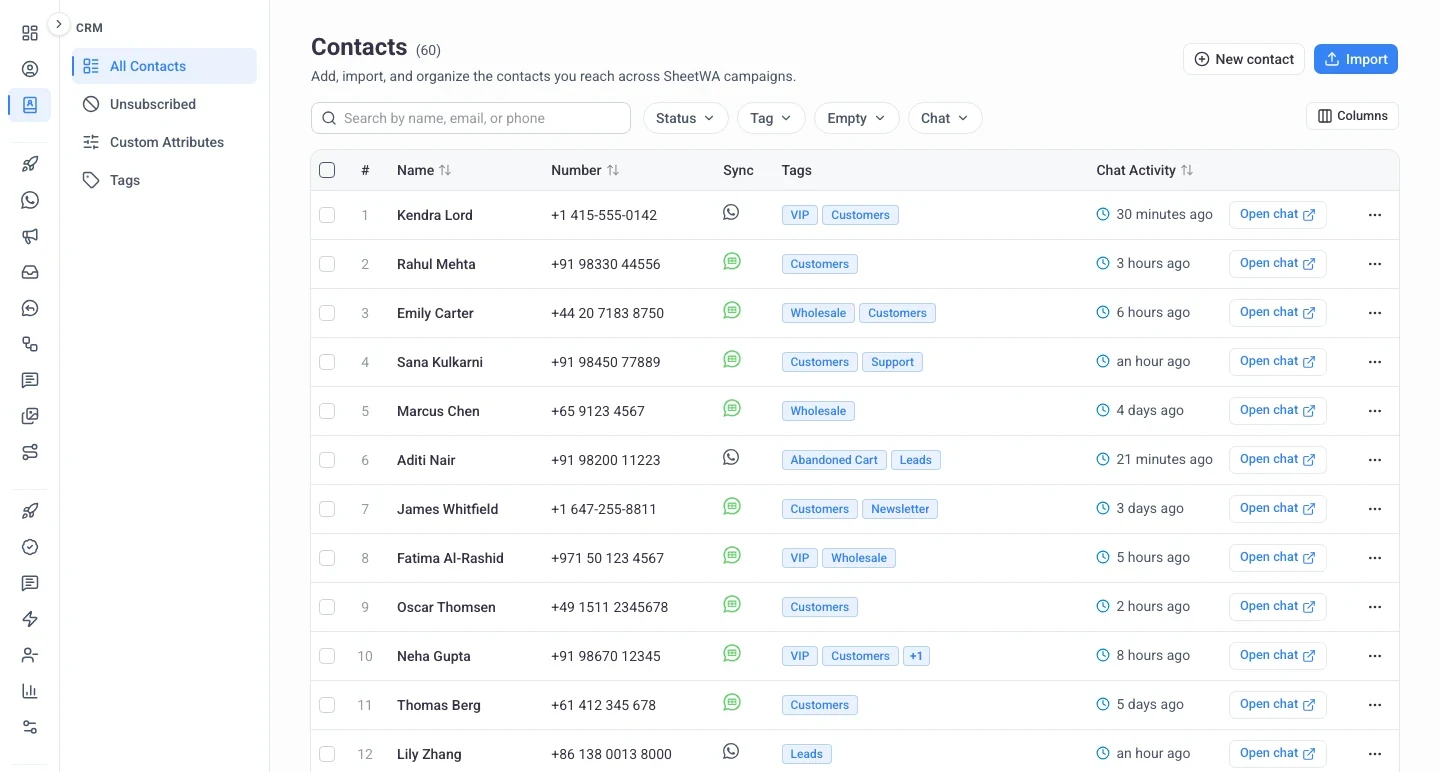
SheetWA's WhatsApp CRM keeps tags, custom fields and chat history on every contact, so you know who each person is, when they last messaged and what to send next. It runs on the official WhatsApp Business API.
Signs you need a WhatsApp CRM
“I have a list of numbers and no idea who any of them are.”
Tags and custom fields, on every contact.
“I keep messaging people who already asked me to stop.”
STOP removes them. Every send respects it.
“My contact list is spread across three different spreadsheets.”
Import once from Sheets, Excel or CSV.
What is a WhatsApp CRM?
A WhatsApp CRM is customer relationship management software that lives where your customers already talk to you: WhatsApp. Instead of a phone book, every contact gets a record with tags, custom fields, opt-in status and the full chat history, and your broadcasts, automations and team inbox all work from that one record. Because the contact list, inbox and campaigns are one product, nothing has to sync between tools, and it all runs on the official WhatsApp Business API.
One record per customer
Tags, custom fields, chat activity and opt-in status together.
Built for sending
Any tag or field filter becomes a broadcast audience or an automation rule.
Shared by the team
One workspace, one list, with admin and member roles.
Key Features of SheetWA WhatsApp CRM
Tags and Custom Fields on Every Contact
Label your customers the way your business actually thinks about them, then build any audience in seconds.
- Create your own tags and assign them to one contact or hundreds at a time.
- Add custom fields for text, numbers, dates or yes and no answers.
- Filter by tag, status, or any field you have left empty, so nothing gets missed.
New Chats Become Contacts Automatically
Someone messages your number for the first time and they land in your contact list, without anyone typing them in.
- Each new sender is saved with their WhatsApp display name when WhatsApp shares it.
- Tag them and add notes from the chat itself, so the record is ready for your next broadcast.
- Prefer adding contacts by hand? Turn auto-save off for your workspace.
See When Every Customer Last Messaged
Your contact list shows the state of every conversation, not just a phone number.
- A chat activity column shows how long ago each person messaged you.
- Hover any row to read their last message and the exact time it landed.
- Open the conversation in your team inbox straight from the contact row.
Bring Your List In From Google Sheets or Excel
Point us at your spreadsheet and your contacts are ready to message in minutes.
- Import from Google Sheets, CSV or Excel with the columns mapped for you.
- Create new custom fields while you import instead of setting them up first.
- Choose how duplicates are handled and see exactly what will land before it does.
Opt-Outs Handled For You
Stay on the right side of your customers and of WhatsApp policy without doing the bookkeeping.
- A reply of STOP unsubscribes that contact instantly, START brings them back.
- Pick your own keywords and confirmation replies for your workspace.
- Broadcasts, automations and auto replies all skip unsubscribed contacts.
Birthday and Renewal Messages That Send Themselves
Turn the dates and tags on your contacts into messages that go out on their own.
- Every workspace starts with date fields for birthdays and anniversaries.
- Build a rule from any mix of tags and custom fields, then pick your template.
- The audience is worked out fresh every day, so new contacts are included.
Private Team Notes on Every Contact
Keep the context your team needs on the customer record, where the customer never sees it.
- Write a note from the contact drawer or straight from the chat in your team inbox.
- Each note shows who wrote it and when, and appears on every chat with that contact.
- Notes are never sent to the customer, and only the author or an admin can delete one.
WhatsApp Business app contacts vs a WhatsApp CRM
The app gives you labels. A CRM gives you a record that your sends can use.
| Feature | SheetWA WhatsApp CRM | WhatsApp Business app |
|---|---|---|
| Contact record | Tags plus custom fields for text, numbers, dates and yes/no | Name, number and labels |
| Import | Google Sheets, Excel or CSV with columns mapped for you | One at a time from the phone |
| New contacts | Saved automatically when they message you | Save each number by hand |
| Who can see it | The whole workspace, with roles | One phone and its linked devices |
| Last contact | A chat activity column with the last message and time | Scroll the chat list |
| Opt-outs | STOP and START handled, every send respects it | Manual |
| Follow-ups | Birthday, renewal and tag-based messages that send themselves | Reminders you set yourself |
| Broadcast audience | Any tag or field filter | Lists of up to 256 saved contacts |
Contact record
SheetWA WhatsApp CRM
Tags plus custom fields for text, numbers, dates and yes/noWhatsApp Business app
Name, number and labelsImport
SheetWA WhatsApp CRM
Google Sheets, Excel or CSV with columns mapped for youWhatsApp Business app
One at a time from the phoneNew contacts
SheetWA WhatsApp CRM
Saved automatically when they message youWhatsApp Business app
Save each number by handWho can see it
SheetWA WhatsApp CRM
The whole workspace, with rolesWhatsApp Business app
One phone and its linked devicesLast contact
SheetWA WhatsApp CRM
A chat activity column with the last message and timeWhatsApp Business app
Scroll the chat listOpt-outs
SheetWA WhatsApp CRM
STOP and START handled, every send respects itWhatsApp Business app
ManualFollow-ups
SheetWA WhatsApp CRM
Birthday, renewal and tag-based messages that send themselvesWhatsApp Business app
Reminders you set yourselfBroadcast audience
SheetWA WhatsApp CRM
Any tag or field filterWhatsApp Business app
Lists of up to 256 saved contactsHow to choose a WhatsApp CRM
Six checks to run on any WhatsApp CRM before you commit, ours included.
Official API or browser extension?
Extension CRMs sit on top of WhatsApp Web on one computer. API CRMs run on Meta's official platform, so the whole team works from one number.
Can it read your spreadsheet?
Most contact lists start in Google Sheets or Excel. Check that the import maps your columns and lets you decide how duplicates are handled.
Are opt-outs automatic?
People who reply STOP and keep getting messages tend to block or report you, which lowers your number's quality rating. Every send should skip them on its own.
Can the whole team use it?
Look for one shared contact list, roles that limit who can delete, and private notes your teammates can read before they reply.
What will it cost each month?
Add the software plan to Meta's charges for template messages. Replies inside the 24-hour customer service window are free.
Do you need a native CRM sync?
If your team lives in Zoho, HubSpot or Salesforce, a direct sync matters. If WhatsApp is your main channel, a WhatsApp-first CRM is simpler.
How to use WhatsApp as a CRM
From a spreadsheet of numbers to a contact list that works for you.
Connect Your Number
Link your WhatsApp Business API number to SheetWA. Keep it in the WhatsApp Business app in coexistence mode if you like.
Import Your Contacts
Paste a Google Sheets link or upload Excel or CSV. Columns map automatically, and you can create custom fields during the import.
Tag and Organise
Create the tags your business thinks in, apply them in bulk, and fill the fields that matter: city, plan, renewal date.
Message and Follow Up
Broadcast to a tag, open any chat from the contact row, or set a date rule so birthdays and renewals send themselves.
WhatsApp CRM integration with Google Sheets, Excel and AI tools
Contacts come in from a sheet or a file, and AI tools can work on them through the MCP server.
Google Sheets
Running a Google Sheets CRM today? Paste the sheet link, pick the tab, and the headers become fields. Re-import to update.
Excel and CSV
Upload a file and choose how duplicates are handled before anything lands.
WhatsApp MCP server
Read contacts, add tags and send templates from Claude, Cursor or VS Code.
Learn moreAlready on Zoho, HubSpot or Salesforce?
Export your contacts to a sheet and import them here. SheetWA handles the WhatsApp side; a direct sync is not available today.
WhatsApp CRM for sales, support and marketing
The same contact record, used three ways.
Sales
Tag leads by stage, see who went quiet, and follow up from the contact row.
Support
Read the full chat history and your team's notes before you reply, and keep plan and order details on the record.
Marketing
Build audiences from tags and fields, send a broadcast, and let opt-outs remove themselves.
How much does a WhatsApp CRM cost?
Every SheetWA WhatsApp API plan includes the CRM, starting at ₹499 per number a month plus GST. Meta charges separately for the template messages it delivers, and replies inside the 24-hour customer service window are free. Estimate a month with the WhatsApp pricing calculator and compare plans on the pricing page.
Loved By Professionals
Weekly listing updates to 200+ buyer leads, personalized from a Google Sheet with property prices and neighborhoods per buyer. Closed two deals last month from blast replies alone.
Maria
Real Estate
We send our Friday lunch promo to about 300 regulars from a sheet. Usually pulls in around 20 orders, and six months of weekly sends in we haven't had any trouble.
HDA Pizzeria
Restaurant
RSVPs and reminders for 8 to 10 events a month. SheetWA turned a two person job into one person hitting send. Reply tracking flags the "can't make it" responses early.
K2 Events
Event Planner
Cohort enrollment used to be a copy and paste nightmare. Personalized by program and batch from a sheet, with 20% more replies than our previous manual round.
Infinity
Coaching Institute
Pulled lapsed clients from our spreadsheet and sent them a discount code. 15 booked sessions in a week. Staggered scheduling lets me prep once on Sunday.
Soulfull
Wellness Center
Quarterly portfolio updates to 400 clients used to eat two full days. Now it's a sheet refresh and one click, with mail merge handling each client name and advisor. Even compliance signed off after seeing the logs.
Rajesh Kumar
Financial Advisory
Frequently Asked Questions
Explore More WhatsApp Business API Features
Discover powerful WhatsApp features that help you engage customers, boost sales, and simplify communication — all in one platform.
WhatsApp Broadcasting
Send bulk tailored messages to unlimited contacts instantly with better reach and improved engagement, without spamming.
Learn moreWhatsApp Payments
Make it easier for customers to purchase, pay, and check out without leaving WhatsApp with secure in-chat payments.
Learn moreWhatsApp Team Inbox
Collaborate with your team by handling all customer conversations in a single shared WhatsApp inbox.
Learn moreAI WhatsApp Chatbot
Automate conversations 24/7 with an AI-powered chatbot that engages, assists, and converts leads on WhatsApp.
Learn moreWhatsApp Forms
Collect leads, customer data, and feedback — all within WhatsApp chats using interactive, easy-to-fill forms.
Learn morePut Your WhatsApp Contacts to Work
Tag every customer, keep their details in one place, and let your broadcasts and automations reach exactly the right people.
Get Started for Free